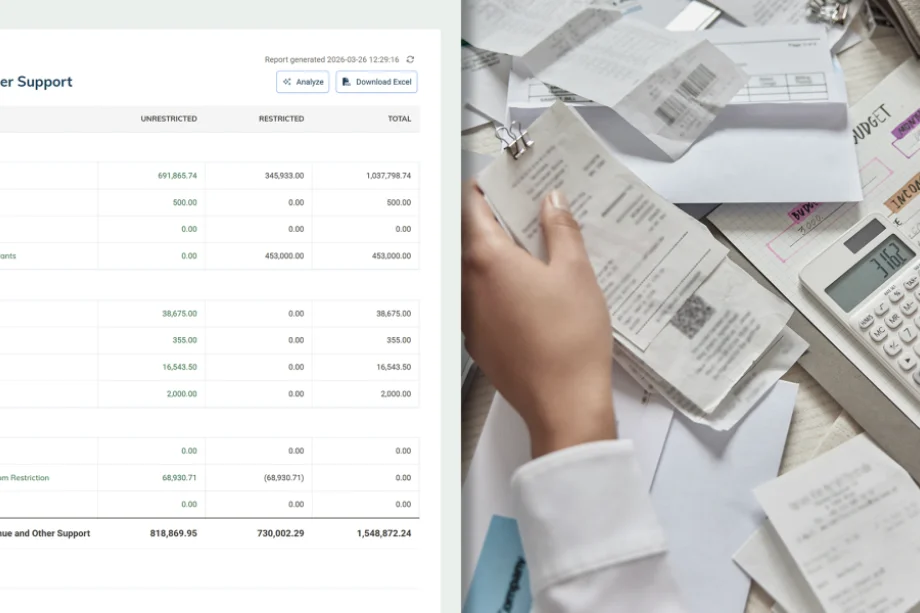
Every dollar you spend on a software subscription is a dollar that doesn’t go toward your mission — yet trying to track that mission on a messy spreadsheet often costs you far more in time and errors.
For the "accidental bookkeeper" — often a volunteer treasurer or program director suddenly handed the organization’s finances — this tension creates real stress. You know your nonprofit must be transparent, but achieving that clarity without a professional background can feel impossible when you’re drowning in receipts and trying to remember which tab holds this quarter’s numbers.
Most small organizations hit a tipping point where manual data entry becomes a genuine liability rather than a money-saver. The right nonprofit accounting software shifts this burden from your shoulders to a system designed to carry it.
The stakes are high. Nonprofit Finance Fund's 2025 State of the Nonprofit Sector Survey found that 36% of nonprofits ended 2024 with an operating deficit — the highest in the survey's ten-year history — and that 52% held three months or less of cash on hand. When margins are that thin, the quiet errors a spreadsheet introduces are ones your organization can least afford.
Modern platforms solve the manual struggle through automated bank feeds — your bank account sends transaction details directly to your software without any retyping. Think of a local animal shelter that used to spend Friday evenings matching paper receipts to a crumbling spreadsheet. By switching to dedicated nonprofit bookkeeping software, they could reclaim five hours a week.
That’s time better spent finding forever homes than chasing missing numbers.
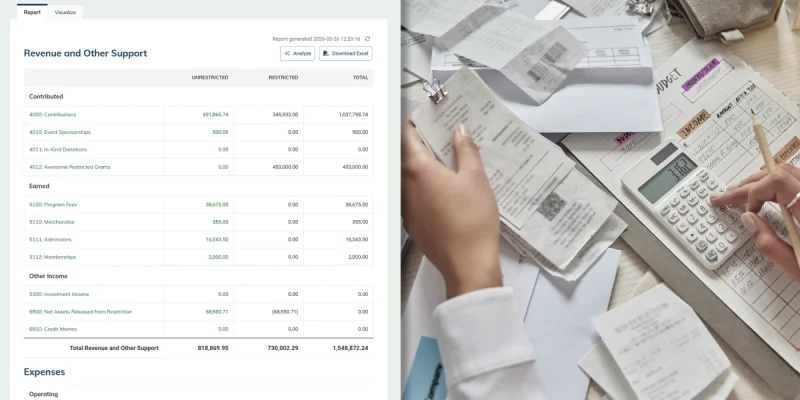
The right tools keep your organization ready for an audit or a hard question from a major donor. Instead of dreading your next board meeting, you pull up a clean digital report that shows exactly where every contribution landed. Your financials stop being a source of anxiety and become a tool for building donor trust.
This guide helps small nonprofits replace error-prone spreadsheets with accounting tools that automate bank feeds, create audit trails, and lock closed periods to strengthen compliance and transparency. It explains fund accounting through the "envelope" method — using tags, classes, and projects to separate restricted and unrestricted dollars for grants and programs — and how to produce donor-ready, Financial Accounting Standards Board (FASB)-aligned reports. We compare common options including spreadsheets, QuickBooks, and Aplos, and explain when it’s time for a purpose-built all-in-one platform. Finally, we’ll share a practical migration plan helps you move to clean, audit-ready books fast.
Why Your Personal Spreadsheet Is Risking Your Nonprofit’s Status
Managing your organization’s money on a grid of cells feels familiar because you likely do it for your personal budget. But general spreadsheet tools like Excel and Google Sheets lack a critical safeguard: transaction locking. In a standard spreadsheet, if you accidentally delete a donation record from three months ago, it vanishes without a trace. That malleability is fine for a grocery list. It’s dangerous when you’re handling public funds.
Dedicated accounting software solves this by creating a permanent record. These tools prevent "accidental history rewriting" through three specific mechanisms spreadsheets simply can’t match:
No Audit Trail: Spreadsheets rarely tell you who changed a number or when it happened, whereas accounting software logs every edit.
Manual Entry Errors: One broken formula can silently throw off your entire year-end report without any warning.
Lack of Transaction Locking: Proper software "locks" closed periods — like finalizing the books for March — preventing retroactive changes that confuse your records.
Maintaining your 501(c)(3) status requires more than good intentions. The IRS expects records that prove exactly where every dollar went without the risk of data loss. Dedicated accounting software handles the legal requirement of keeping permanent, immutable records — but you also need a strategy for organizing that money once it’s tracked. That’s where fund accounting comes in.
The "Envelope" Method: Mastering Fund Accounting Without a CPA
Imagine running a household where your regular paycheck covers the bills, but a birthday check from a relative must be spent strictly on a winter coat. In the nonprofit sector, this concept is the foundation of fund accounting. Unlike for-profit organizations that can pool all revenue together, your organization separates money into digital "envelopes" based on donor intent. You’re not just tracking what’s in the bank — you’re monitoring exactly what each dollar is allowed to do.
Most contributions will likely be unrestricted funds: general donations you can use for rent, salaries, or utilities. Complexity arrives when a donor gives $500 specifically for a summer youth program or a new building roof. These are restricted funds, and you cannot legally spend that money on administrative costs even if your checking account looks healthy. Using fund accounting software built for nonprofits means you can see these invisible boundaries clearly, preventing you from accidentally spending the "roof money" on electricity.
Attempting to maintain these distinctions within a single bank account without a proper tracking system is a recipe for financial errors. Tracking restricted and unrestricted funds is achievable when you use software features like "tags," "classes," or "projects" to assign a specific purpose to every deposit.
Ideally, your accounting software understands the concept of restricted and unrestricted funds out of the box, and rather than relying on a tag, class, or project, you can call a restricted fund what it is — a restricted net asset.
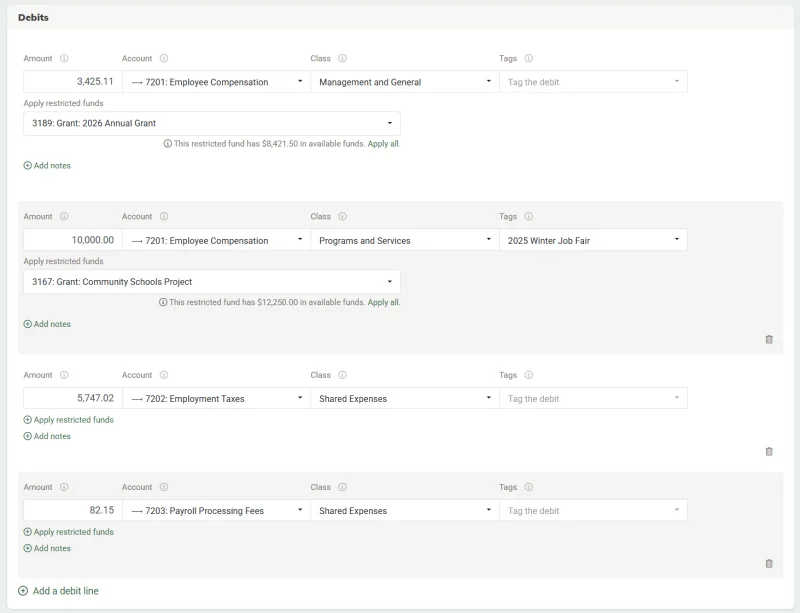
This digital labeling creates the necessary separation without forcing you to open a separate bank account for every program or grant. Understanding that your funds need to sit in different conceptual buckets is the first step toward professional financial management. The next question is which tool helps you manage those buckets — and what you’ll need to give up (or work around) with each option.
QuickBooks, Aplos, and Spreadsheets: Weighing Your Options
When nonprofits outgrow spreadsheets, they usually weigh QuickBooks and Aplos. Spreadsheets are free and flexible but have no audit trail, no automated bank feeds, and no way to enforce fund boundaries — and when your volunteer treasurer moves on, you’re often left with a file only they understood. QuickBooks is familiar and capable, but its "nonprofit edition" layers workarounds on top of a for-profit engine, so restricted funds, functional-expense reporting, and grant budgets all take manual configuration. Aplos is purpose-built for nonprofits and churches and handles fund accounting natively, though it centers on accounting and giving — organizations that also need donor management, email marketing, or grant management end up stitching on extra tools.
If your main worry is simply keeping the books correct without an accounting background, our guide to what "easy" really means for nonprofit accounting software digs into that question specifically.
For organizations at the point where a donation should automatically create a receipt, update the donor record, and post to the general ledger — with no manual steps — that’s when an all-in-one platform like MonkeyPod starts making real sense.
For a side-by-side breakdown of how these platforms compare on fund accounting, grant tracking, donor management, and pricing, see our nonprofit accounting software guide.
How to Track Every Penny of a Grant Without Breaking the Bank
Winning a grant feels like a victory until you realize the reporting attached to it. Commingling restricted grant money with your general operating funds is the fastest way to lose future funding — but you don’t need expensive enterprise tools to keep things separate. Managing grant tracking on a budget often comes down to using the "Project" or "Class" feature in many accounting platforms. Dedicated nonprofit account software takes it a step further. It will understand what a grant is out of the box and will create a new restricted net asset account when you’re awarded a new grant.
However you approach it, think of it as placing a digital sticky note on every specific dollar: money for a playground build never accidentally pays for the office electric bill.
Most nonprofit accounting platforms let you isolate these funds efficiently. To satisfy a grantor’s need for transparency without manual calculations, use this standard workflow:
Create a Restricted Net Asset Account: Set up a specific account for the grant (e.g., "City Youth Grant 2026").
Allocate Expenses: Every time you spend grant money, allocate funds from the associated grant or restricted net asset account.
Run a Report: Generate a report to see exactly how much of the grant remains — in seconds, not hours.
Beyond cash, grants often require you to match funding with volunteer time — what’s known as in-kind donations. While spreadsheets struggle to track non-monetary contributions, donor management features within accounting platforms let you assign a dollar value to volunteer hours (e.g., $25/hour for tutoring) and log them as non-cash entries. This accurate record-keeping satisfies grantors and keeps your data organized year-round.
For organizations with active grant portfolios, MonkeyPod includes grant budget tracking and restricted fund management in every plan. Your budget actuals automatically sync as expenses are recorded, so you can see budget vs. actual in real time without any manual reconciliation. The Grant Tracker add-on goes further, managing the full proposal-to-final-report lifecycle, but you don’t need it to get accurate grant financials from day one.
Simplifying IRS Form 990 and FASB Reports with the Right Tools
Tax season brings a familiar panic to volunteer treasurers, but the secret to a stress-free filing happens months before you ever download the forms. It starts with your Chart of Accounts — the master list of categories you use to classify every dollar. Rather than using generic labels like "Supplies," effective chart of accounts setup involves mirroring the specific line items found on IRS Form 990. By naming your categories to match the tax form — changing "Rent" to "Line 16: Occupancy," for example — you’re essentially completing your tax return in real time with every transaction you log throughout the year.
Beyond satisfying the IRS, you also need to demonstrate financial health through transparency. Donors and watchdog organizations look specifically at your Statement of Functional Expenses to see how much money supports your mission versus administrative overhead. While FASB-compliant reporting sounds intimidating, it’s really a method of splitting costs into three clear buckets: Programs and Services, Management and General, and Fundraising. The right accounting software lets you tag a single electricity bill across these categories based on usage — proving your overhead is reasonable and your donations are going directly to your cause.
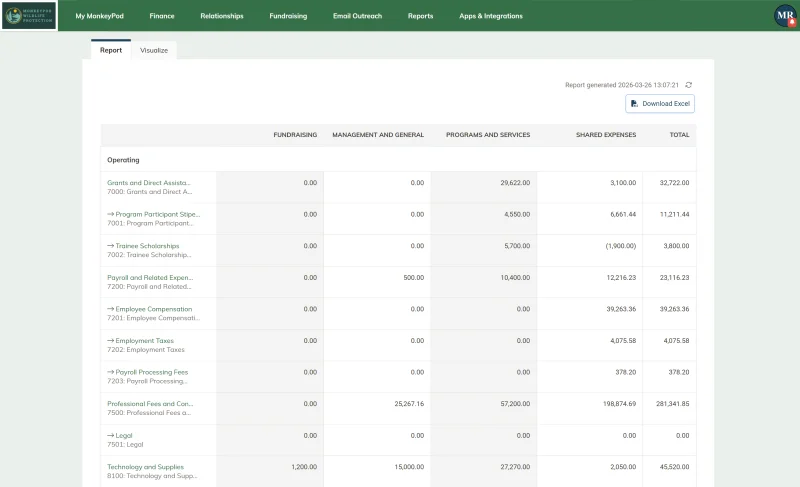
Nonprofit accounting software should be able to generate all the reports you need –– Statement of Functional Expenses, Statement of Activities, and Statement of Financial Position –– without needing to further manipulate them in a spreadsheet. That’s one key limitation of platforms like QuickBooks. Because it’s designed for for-profit companies, it includes for-profit reports like a Profit and Loss Statement and a Balance Sheet. You can manipulate these to generate nonprofit reports, but it’s an extra, manual step.
Efficiency gains continue when you automate donor acknowledgement. Rather than writing individual thank-you letters in January, capable software emails compliant receipts the moment a donation is logged. In MonkeyPod, this happens automatically: every online gift triggers a receipt, a CRM update, and an accounting entry — with no manual steps required.
From Messy Excel to Clean Books: A 5-Step Migration Plan for Your Treasurer
Moving your organization from a chaotic spreadsheet to the right accounting software is a big step — but it doesn’t have to be overwhelming. You’ve moved past the fear of technical jargon and now understand that dedicated nonprofit bookkeeping software isn’t just about compliance. It’s about reclaiming hours you’d rather spend on your mission.
To make the transition smooth, follow this straightforward roadmap:
Select the tool that best matches your organization’s size, revenue streams, and needs.
Set a "Go-Live" date — the start of a new month is good, but it often makes the most sense to switch at the beginning of a new fiscal year.
Export your donor list from your email or spreadsheet and import it into your new system.
Create your chart of accounts and enter your "Opening Balances" based on your last bank statement.
Mark your calendar for a two-hour financial review on the 5th of every month.
The most critical step is number four. Your opening balance is the bridge between your old system and your new one. Don’t try to re-enter three years of transaction history. Take the ending balance from your bank statement the day before your Go-Live date, enter that single number, and start fresh. This creates a clean break and keeps your new system accurate from day one without the headache of historical data entry.
Once you’re running, consistency matters more than perfection. A monthly routine — categorize recent transactions, reconcile your bank feed, review your fund balances — keeps you audit-ready year-round. No more panic-searching for a grant expense the night before a board meeting.
If you’re ready for a platform where accounting, donor management, and fundraising all live together — where your data works for you instead of the other way around — we’d love to show you what MonkeyPod looks like in practice. Schedule a free demo and get back to focusing on your mission.